

Overview
Loom is a scripting language for Unreal Engine that compiles to ordinary Blueprint assets. You
write each Blueprint as a text file, such as BP_Counter.lm, and the Loom editor plugin compiles it
whenever you save.
- Unreal
- 5.6+
- Platform
- Windows · Linux
- Latest
- 0.1.0
A first look
Section titled “A first look”A short function in Loom, and the Blueprint it becomes:
fn Clamp(x: int, lo: int, hi: int) -> int { if x < lo { return lo } if x > hi { return hi } return x}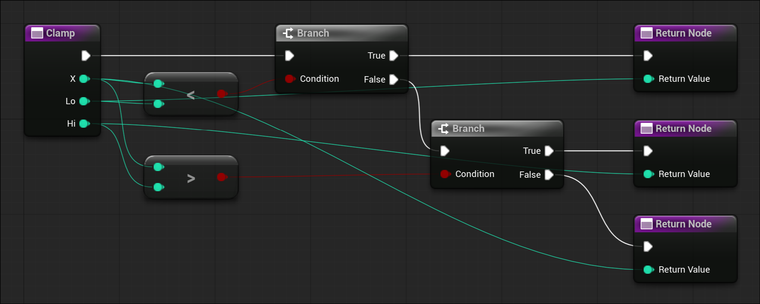
How it works
Section titled “How it works”- You write
BP_Counter.lm, a text file in your project’sContentfolder. It is the source. - When you save it, the Loom plugin compiles it inside the Unreal editor. If something is wrong, the Message Log says what, under Loom.
- You get the
BP_CounterBlueprint beside it, which is packaged and loaded like any other.
The output is an ordinary Blueprint, so it runs wherever Blueprints run, with no Loom runtime and
no engine changes. The plugin is only needed in the editor. The graph it generates isn’t meant to
be read or edited by hand: the .lm file is the source, in the same way you read C++ rather than
the machine code it compiles to.
What text makes possible
Section titled “What text makes possible”- Larger programs
Functions, loops, arrays and structs that would be impractical to wire by hand. The examples go as far as a whole game written in Loom.
- Source control
- Diff, review, merge and search Blueprint logic like any other code.
- Coding agents
Agents read and write Loom like any other text, and the plugin’s MCP server lets them check their work. See Coding agents.